Updated
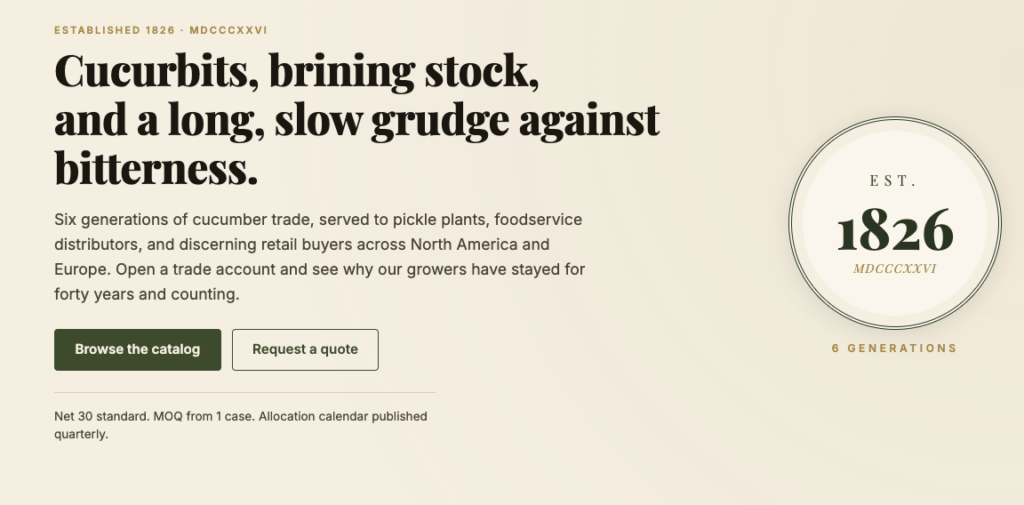
I just finished building a fictional 200-year-old cucumber distributor.
It is a B2B trade catalog. Twelve cucumber SKUs. Real bulk pricing tiers. Real MOQ on every product. Real cart, real checkout, real order numbers. The whole thing took me about a week of focused work.
You can poke at it. The URL is shopware.contentcucumber.com. The brand is called Cucumber & Co., established 1826 in Salem, Massachusetts, six generations of cucurbit trade. None of that is real. All of the commerce machinery underneath it is.
The two pieces of software doing the work are Shopware and Astro. I picked them on purpose. After this build I’m putting every serious B2B commerce project on this stack.
What I built
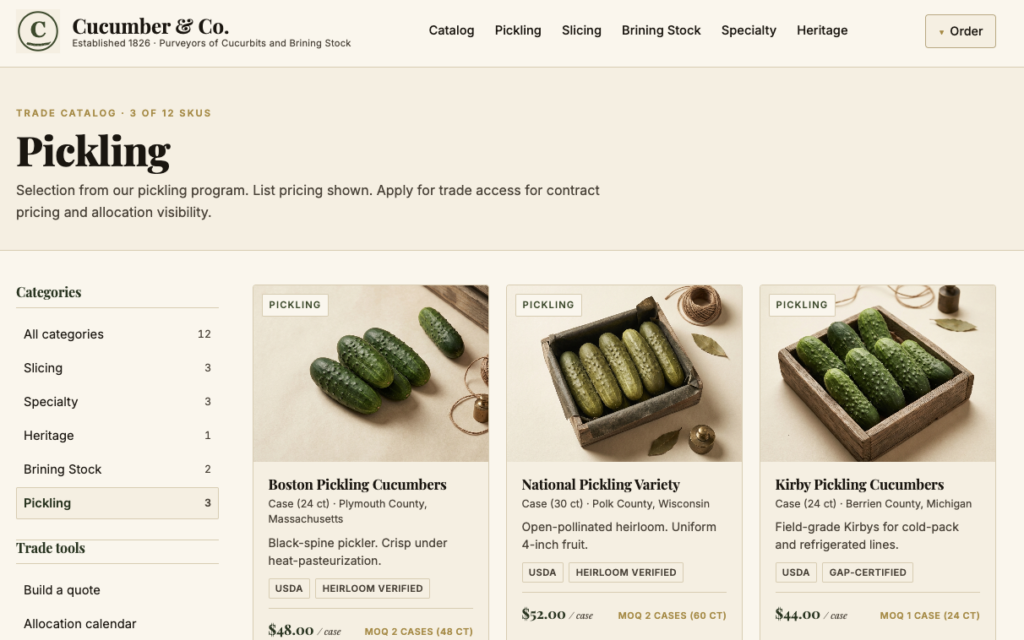
The site has the parts you’d expect from a real distributor catalog. A homepage with a hero seal and a featured product list. A category-filtered catalog of twelve cucumber varieties (Kirby Pickling, English Slicing, Brining Stock No. 2, Persian, Suyo Long, Beit Alpha, Mexican Sour Gherkins, Pickling Brine No. 4, National Pickling Variety, Boston Pickling, Lemon Cucumbers, Armenian Yard-Long). Product pages with bulk tier pricing, minimum order quantity, certifications, origin, and a vintage mark for the heritage varieties. A cart, a checkout that registers a guest customer, an order confirmation page that ties back to a real Shopware order in the admin.
The last automated test I ran walked the full flow in twelve seconds and placed real order number 10004. That receipt is sitting in the Shopware admin right now.
The whole production stack is one server, three Docker containers (Shopware, Astro, Caddy), and one shell script that seeds the catalog. I built it on Shopware’s Community Edition, which is the open-source entry point. The same code path I wrote here runs unchanged on Shopware’s commercial editions, where the production B2B workflows live.
Why I’m putting B2B on Shopware
Shopware is an open-source enterprise commerce platform out of Germany that fits complex B2B operations without getting you into a pickle. After this build, I get the hype.

The store-api is the cleanest commerce API I’ve worked with. I added a line item to the cart with two HTTP headers and a JSON body. I placed an order with one POST. The session token comes back in a response header on the first cart call and you ride it through every subsequent request. It is the kind of API where you don’t need an SDK to use it. You need fetch.
The admin is real software. It is not a dashboard with a few toggles. It is a full operations product with sales channels, tax rules, multi-currency, multi-language, variant configurators, advanced pricing tiers, EDI-friendly exports, and a Shopping Experiences page builder so non-technical staff can edit category landing pages without touching code. My fictional distributor’s allocation manager could run a real account out of it.
The data model assumes B2B from the floor up. Tier prices, advanced prices, customer-group pricing, hidden products per sales channel, multi-currency sales channels, custom properties on products. The Community Edition gave me everything I needed to sketch out a serious B2B catalog.
For a real distributor running real customer accounts at scale, you graduate to Shopware’s commercial editions. The B2B Suite is where allocation managers, sales reps, and procurement teams stop fighting the platform and start running accounts inside it. Quote management. Customer-specific assortments and pricing. Fast order forms keyed off SKU lists buyers paste in from their ERP. Sales rep impersonation for assisted ordering. Individual customer contracts with their own price books. Approval workflows for purchase orders over a threshold. EDI integration. Budgets and credit limits per buyer. All of it lives on the same admin, the same APIs, and the same data model I built against here. The Community Edition lets you prove the architecture. The commercial editions are what you ship to production when “complex B2B” stops being a tagline and starts being your invoice schedule.
Self-hosting Community Edition was a nine-second decision. The Dockware project ships the entire Shopware platform as a single Docker image with demo data baked in. I pulled it, ran it, and had a working backend in ninety seconds. Then I deleted the demo products and seeded my twelve cucumbers via the admin API in another ninety seconds.
Why I’m putting the storefront on Astro
Astro is the part of this stack I get to talk about most when other developers ask me how this site is fast. The answer is that most of the site ships zero JavaScript to the browser.
The catalog page on this build sends roughly forty kilobytes of HTML and CSS to the visitor. No framework runtime. No hydration. No client bundle of any kind. The product images are real. The text is real. The page is rendered on my EC2 box and shipped as plain HTML, the way the web was designed to be.
That matters for B2B specifically. A buyer at a foodservice distributor pulling up your catalog on hotel WiFi between sales calls is not going to wait three seconds for a React bundle. They are going to bounce. Server-rendered HTML loads in a fraction of that time and Google notices.
Astro lets me drop in interactive bits where I want them. The B2B world has a few legitimate cases. A variant configurator. A live cart count. An async add-to-cart. For each of those I can pull in Vue or React or Svelte for that one component, only that component, only on the page where it matters. This is the islands architecture and it solves a problem every other commerce framework pretends does not exist.
The developer experience is the third reason. Building a server-rendered page in Astro is a .astro file with a frontmatter block of code that runs on the server, then HTML. No getStaticProps. No getServerSideProps. No ceremony. I called Shopware’s store-api with a plain fetch() in the frontmatter and dropped the result straight into the markup.
How I deployed it on AWS
The whole stack lives on a single EC2 instance in us-east-1. Three Docker containers behind a Caddy reverse proxy. Shopware on one. Astro on another. Caddy fronting both. One Elastic IP. One Route53 A record pointing at shopware.contentcucumber.com. One docker-compose file describing all of it.
Caddy is the piece I want every developer working in B2B to know about. A short config tells it that Astro serves the storefront paths and Shopware serves /admin, /store-api, /media, and a handful of related endpoints. Caddy provisioned a Let’s Encrypt TLS certificate on the first request to the domain. No certbot. No cron job. No ACME troubleshooting at 1 AM. The part of the stack that used to take a half-day takes zero seconds.
A TypeScript script seeded the catalog from my laptop in one execution. It hit the Shopware admin API to upload twelve product images, create twelve products with their B2B metadata, set sales channel visibility, and tag them with the right tax rule. The Shopware admin API is documented well enough that the whole script is a hundred lines. Tear down the EC2 box, spin up a fresh one, run the script. You have a clean working copy of the demo in under three minutes.
Astro builds into a single Node process running on port 4321 inside its container. Shopware is a single PHP-and-MySQL container running on port 80. Caddy listens on 80 and 443 and routes to whichever container the request belongs to. The whole production deploy is one shell command on the EC2 box. Updating the storefront after a code change is rsync, docker build, docker compose up.
The catalog page on this stack sends about forty kilobytes of HTML and CSS to the visitor. Mobile, desktop, 4G, 3G. It is just fast.
A week of focused work. Empty AWS account to live B2B storefront with TLS, twelve real products, working cart, working checkout, real order numbers, and a Playwright test suite that proves the flow end to end. That is the kind of pace this stack supports when the platform stops being the long pole.
What this means if you sell in B2B
The platform stopped being the long pole.
For a long time, the answer to “why isn’t our B2B commerce site live yet” was “the platform is the bottleneck.” Not anymore. With open-source Shopware and Astro, a competent engineer can stand up a full catalog and checkout in a week.
What’s left is the part that was always the hardest. The brand. The merchandising story. The product copy that makes a buyer at a $400-million-revenue foodservice distributor pick you over the lower price.
You can see that in the Cucumber & Co. demo. The Shopware admin has twelve generic product records with SKUs CUCO-001 through CUCO-012. The storefront tells a story about a 200-year-old family-held trade house in Salem, six generations of cucurbit growers, allocation calendars, brining stock by grade, vintage marks. The data model is generic. The brand is the value.
That is the world Content Cucumber writes for. And on this stack, we can build the storefront too.
Try it
Open the demo: shopware.contentcucumber.com. Click into a product. Add it to the cart. Place an order. Watch a real order number tick over in the Shopware admin. The whole thing is a working proof that the platform is no longer the hard part.
If you sell in B2B and you have an idea for a Shopware store you want to see live, that is the gap we close. We build the POC, then we write the words that make it matter.
Let us write product content that converts
Ecommerce Content Services →